 Ask My Fans
Ask fans anything in chat. Hear what they really want, then sell it to them.
A vote tells you which option won. Ask My Fans tells you what each fan wants. Ask a question privately in chat, let fans answer in their own words, and every reply is sorted into themes. Then turn any answer into a Fanvue list and offer it only to the fans who asked.
Find it in the Fanvue App Store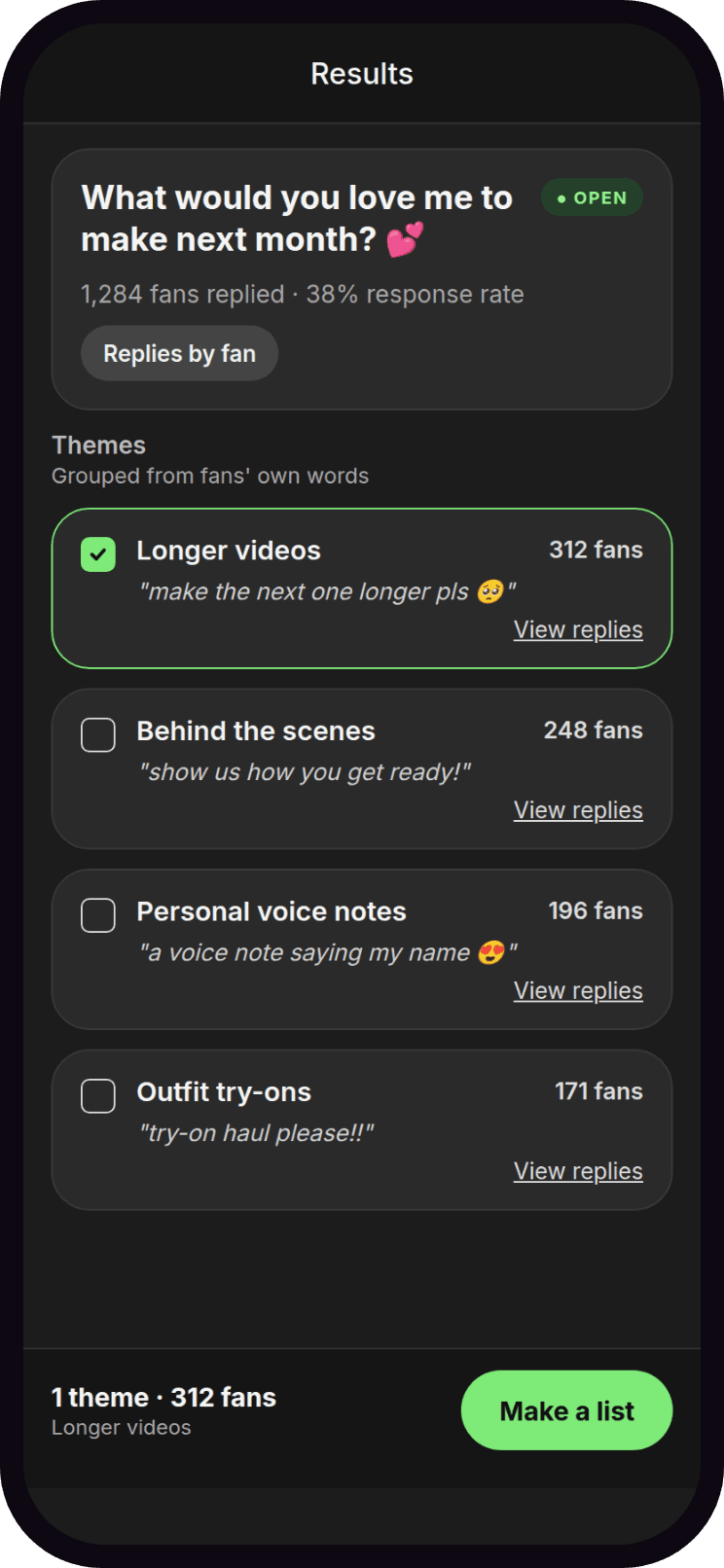
What you get
- Private questions, real conversations
- each fan gets your question as a message in their chat, so every reply starts a conversation
- Answers in fans' own words, sorted
- long answers, emoji, two ideas at once, even "anything but another gym set," grouped into clear themes
- See who wants what, fan by fan
- every reply, tagged with what it means
- Offer it only to the fans who asked
- any answer or theme becomes a Fanvue list, filtered to subscribers, top spenders, or past buyers
- Always know what to ask
- ready-made questions and suggestions, in your own voice
 Step 1
Ask privately, right in chat
Set your question and send it straight to each fan's own chat — a private message, not a broadcast, which is where most Fanvue sales actually happen.
 Step 2
Hear what fans want, in their own words
Long answers, emoji, two ideas at once — every reply lands in the right theme automatically, so there's no reading or tallying hundreds of chats by hand.
 Step 3
Offer it only to the fans who asked
Turn any theme into a Fanvue list, filtered to subscribers, top spenders, or past buyers — ready for your next offer from your Fanvue chats.
Frequently asked questions
- Do fans need to install anything?
- No. They reply to a normal message or comment on your post, the same way they always do.
- Should I send a message or post to my feed?
- Both work. A message gets private, one-to-one replies — great for selling and personal questions. A feed post lets fans answer in the comments where everyone can see, which suits fun and content-planning questions. Templates pick the usual choice for you, and you can switch with one tap.
- How do I sell to the fans who answered?
- Make a list from their answer, then send that list a message or a paid message straight from your Fanvue chats, like any other mass message.
- Does it work with my chatbot app?
- Yes. Ask My Fans never replies to fans on its own, so it works alongside any chatbot or messaging tool you already use.
- Can I run several polls at once?
- You can have one chat poll and one feed poll open at the same time. Only one chat poll collects replies at once, so every private reply is matched to the right question.
- Is it free to try?
- Yes. Every feature is included on the free plan, with 2 polls a month. Upgrade any time to remove the limit.